
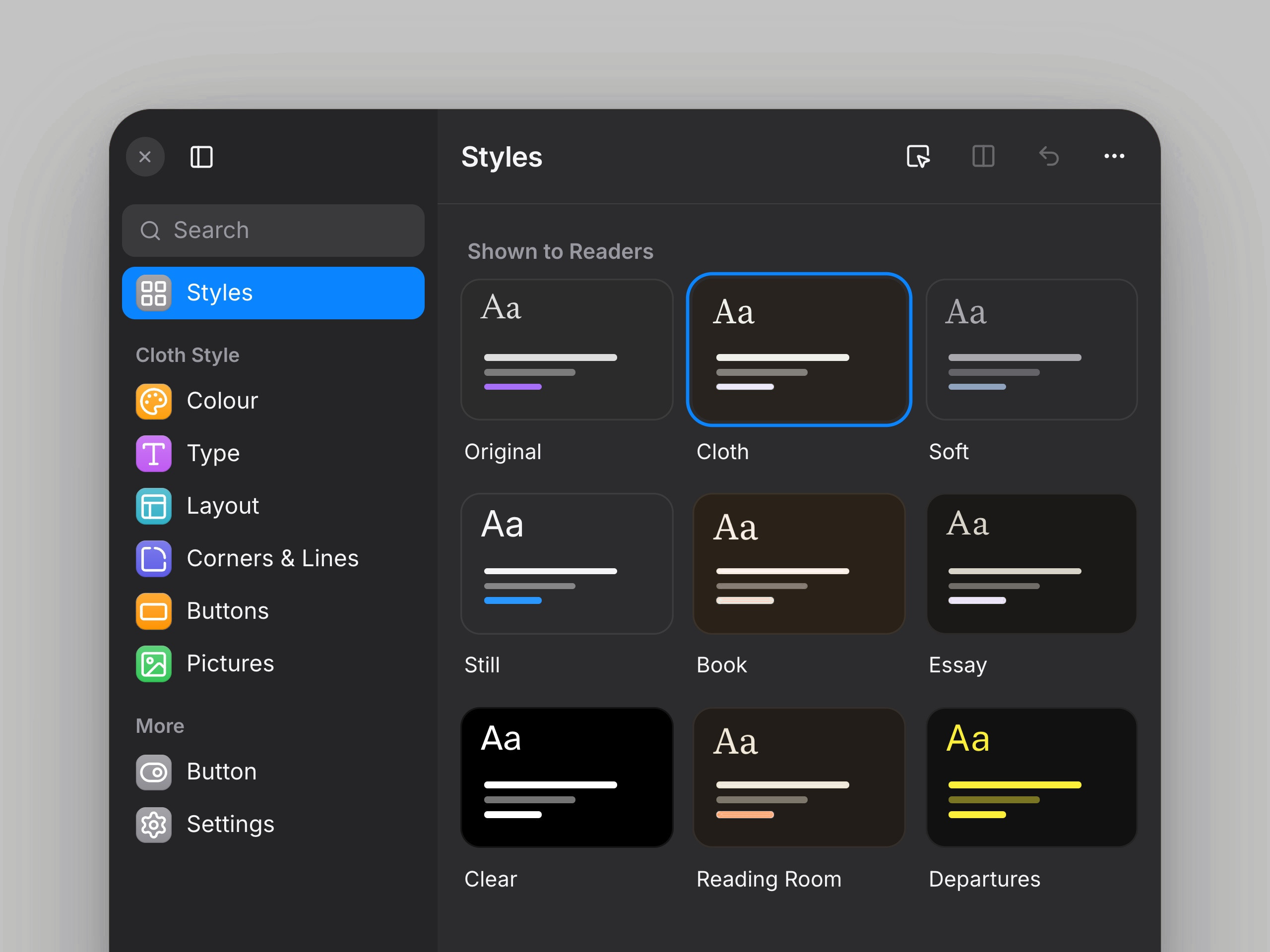
Vibetiles is a design panel for WordPress. It opens right on your live site, and you change colours, fonts, sizes and spacing while you look at the real page. It’s free, open source and still in beta.
In short
- A panel for you. Colour, type, layout, corners, buttons and pictures, each with its own dials. When you like a look, you save it as a style.
- A small panel for your readers. Text size, light or dark, and the styles you choose to show them.
- Styles as links. Copy a style as a link and paste it into Vibetiles on another site. Or pick one from the style library.
- AI, if you want it. With the Vibetiles Connector, an assistant like Claude can read and turn the same dials, over MCP. Every change can be undone, and nothing goes live unless you say so.
- Not only for WordPress. There’s also a version for plain HTML sites: one folder your AI adds to the site.
Your theme stays as it is. Until someone turns a dial, your page looks exactly like before, and the Original tile takes you back there at any time. This blog runs on Vibetiles too, so you can press the sliders icon and play with it while you read.
Why dials?
An AI can build a website in minutes. It’s the fine-tuning that takes forever: “a bit warmer”, “the headings a touch smaller”, “less space at the top”. Words are great for the big changes. But the last ten percent is about what your eye tells you, and every time the AI rewrites your code, something else can break.
So with Vibetiles, nobody rewrites code. You turn the dials, and if you connect an AI, it turns the same ones. Every change is one step you can take back.
The panel
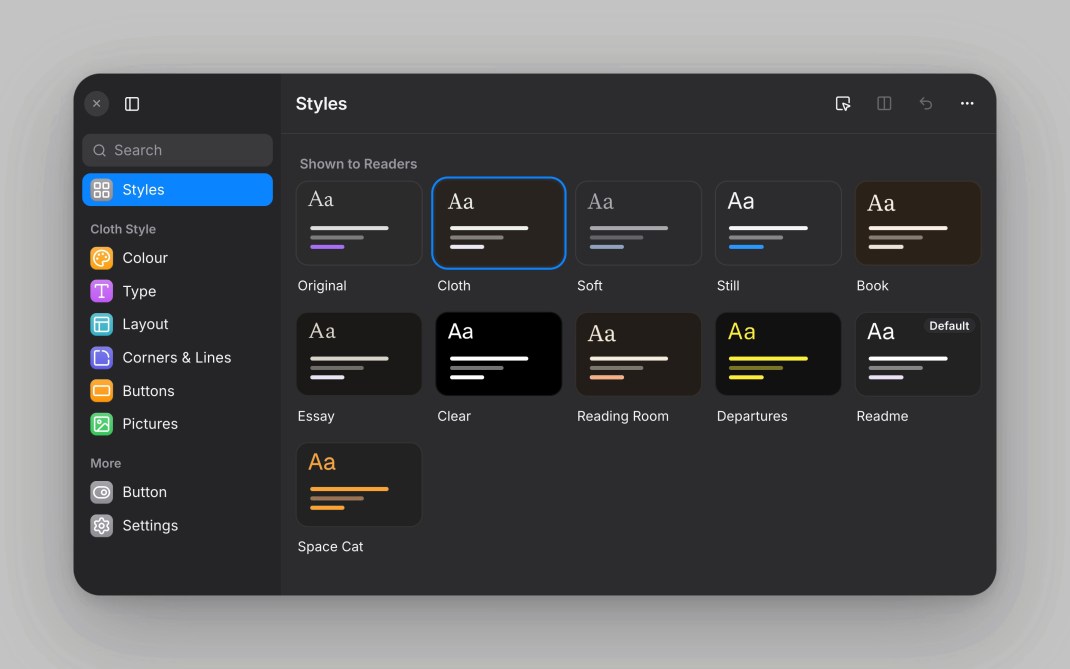
The panel is a small window on your page. The sections are on the left, the dials on the right:
- Styles: your looks, as tiles.
- Colour: page, text and accent, separately for light and dark.
- Type: more than 80 openly licensed fonts, sizes and line spacing, with dials for headings, reading text, quotes, small print and the interface.
- Layout: how wide the page is and how long the lines are.
- Corners & Lines: how round the corners are and where lines go.
- Buttons: colour, shape and style, from the main button to the quiet text button.
- Pictures: how your pictures are framed and shown.
Don’t know what something is called? No problem. Click the pointer at the top of the panel, then click a heading or a date on your page, and the panel opens the dial for exactly that part.
Styles
A style is a whole look: colours, fonts, sizes and spacing, saved together. Vibetiles comes with six of them. Original is simply your theme as it is, and then there are five calm reading styles: Soft, Still, Book, Essay and Clear.
You can save any state of the dials as a style of your own. If you turn a dial on Original, Vibetiles makes a copy for you, because Original always stays your theme.
The styles under “Shown to Readers” are the ones your readers can pick. The others only you can see. Drag a tile from one group to the other to show or hide it, and use the ••• menu to make a style your site’s default.
Good to know: a style you show saves itself, so your readers see your changes a moment later. If you want to try things in peace, work on a copy you don’t show yet.
What do your readers get?
Your readers get a smaller panel: text size, light or dark, and the styles you show them. What they pick stays in their own browser and isn’t sent anywhere. You decide how much of it they see, or you hide their button completely.
Styles travel as links
Copy a style as a link, and anyone with Vibetiles can paste it into their own panel. The whole look arrives, ready to keep tweaking, on any block theme. There’s no account and no marketplace. A link in an email or a chat is all it takes. And if you switch on “Everyone can copy styles”, your visitors get a copy button too. Ready-made styles to copy and try are in the style library.
A style holds design settings and nothing else. When you paste one, Vibetiles checks it against a list of allowed settings and drops everything else, including anything that could carry code. A pasted style stays private until you decide to show it.
What we’re planning: a small style library here on elmastudio.de. You share a style you made, and others copy it into their own Vibetiles. It will most likely start as a simple page on this site.
How do I get started?
1. Install the plugin
Vibetiles works with block themes. It grew up in Architrave, and we also test it on Twenty Twenty-Five.
- In WordPress, go to Plugins → Add New Plugin, search for “Vibetiles”, then install and activate it. It’s on wordpress.org, so updates arrive just like for any other plugin.
- Rather have a file? The same version is on GitHub: Code → Download ZIP, then Plugins → Add New Plugin → Upload Plugin.
- Open your site while you’re logged in. Press the small button on the page, or
Alt+D, and the panel opens.
A nice way to start: click through the six tiles under Styles, then play with the accent under Colour. The arrow at the top takes back every step, so you can’t break anything.
2. Connect your AI
The Vibetiles Connector works with assistants that speak MCP, like Claude Code or Claude Desktop. The AI opens your site in its own Chrome window, and you can watch it turn the dials.
You need a site with Vibetiles and an administrator account, Node.js 18 or newer, and Google Chrome. Pick a post on your site: the AI uses its text to check how well the page reads. In Claude Code it’s one line, with your post’s address at the end:
claude mcp add vibetiles -e VIBETILES_URL=https://example.com/hello-world/ -- npx -y github:manuelesposito/vibetiles-connectorFor other apps, the steps are on GitHub. The first time, a Chrome window opens on your post. Log in there once, and the login stays in a Chrome profile of its own. Then just talk to it, for example:
- “Describe my site’s design, then make it feel calmer.”
- “Make the headings bolder and one step bigger.”
- “Try a darker accent on the dark side, and keep it only if the links still read well.”
- “Undo that.”
The AI can read every setting and what it means, change settings one step at a time (each one can be undone), try a change before keeping it, look at the page, and check contrast, text size, line length and line spacing. What it can’t do is publish on its own: only when you say “Publish my design” does the look become a style your visitors see. It only reaches the design settings, and it only talks to your own site.
3. Without WordPress
Vibetiles also runs on a plain HTML site. The whole panel is one folder: no server, no build step, no account. The instructions are written for your AI, so all you do is copy one sentence into it.
For a new site:
Build my website with Vibetiles inside. Instructions: https://github.com/manuelesposito/vibetiles-htmlFor a site you already have:
Add Vibetiles to my website. It must look exactly as before until someone turns a dial. Instructions: https://github.com/manuelesposito/vibetiles-htmlYour site looks exactly as before. Open it once with ?design at the end of the address and you get the full panel, while your visitors get the small one. When you’re happy, tell your AI “Publish my design”, and it writes the style into vibetiles/site.js.
What about privacy?
No analytics, no accounts, nothing sent home. The fonts aren’t bundled: the first time you pick one, your server fetches it once from jsDelivr and keeps it in your uploads, so your visitors never connect to a font service. Vibetiles only stores the styles you show. If you delete the plugin, the fonts and styles go with it, and your theme is exactly as it was.
Still in beta
We use Vibetiles here every day, and it keeps getting better. It’s free under the GPL, on wordpress.org and on GitHub. Of course not everything is perfect yet. If something looks odd on your theme, please tell me on GitHub. Notes about a specific theme help the most. All the links are on the Vibetiles page.
Vibetiles grew up in Architrave, which is now on wordpress.org too. You can read more on the Architrave page and in its release post. Thanks for trying it, and I’m looking forward to your feedback!

Leave a Reply