
Last updated in August 2026. Checked on WordPress 7 and PHP 8, theme version 1.0.9.
View live demos
Download the theme
Enjoyed this? Then subscribe to the newsletter or follow us on YouTube. It costs nothing and helps more than anything. We have been at this since 2009, and we will keep going.Enjoyed this? Then follow us on YouTube. It costs nothing and helps more than anything. We have been at this since 2009, and we will keep going.
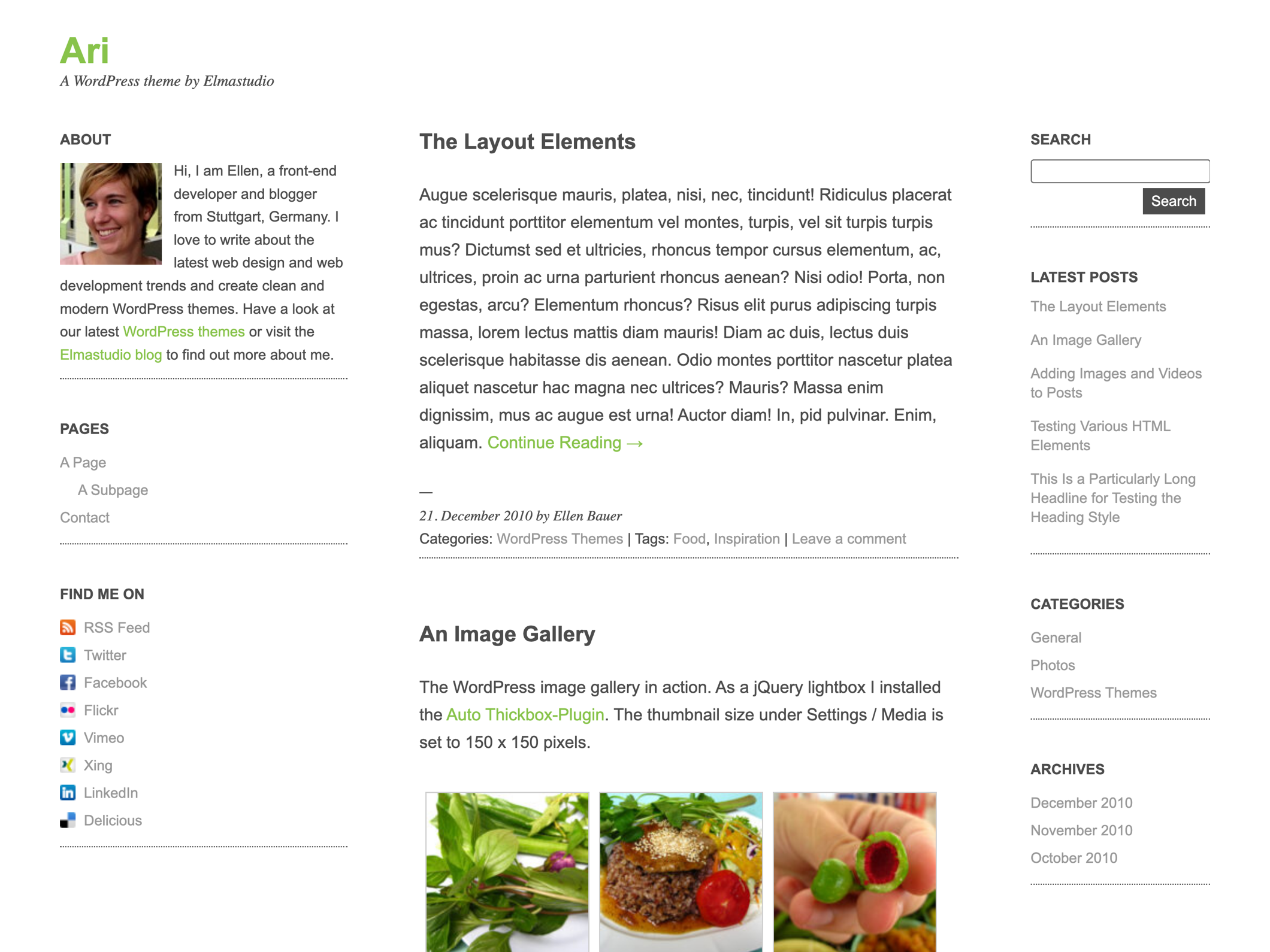
Ari is a light, minimal blog theme: a quiet column for the text, two sidebars for everything that belongs beside it, and a light and a dark style. It is a classic theme, not a block theme, so its colours and its logo are set on the theme options page rather than in the Site Editor.
The Ari Theme Overview
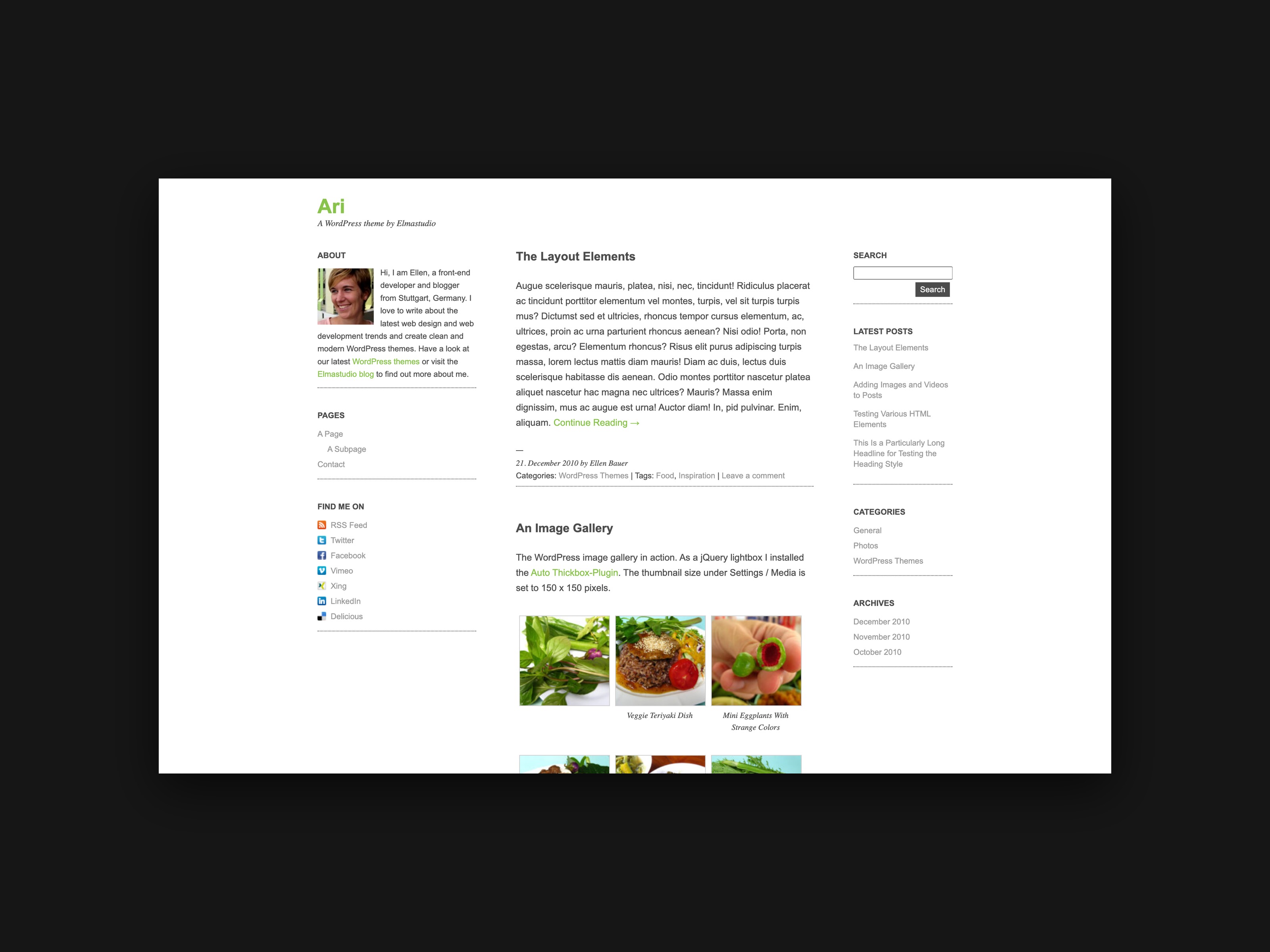
Ari is a free WordPress theme with a clean, minimalistic design. The theme has a responsive layout that is optimized for different browser sizes and mobile devices (tablet pcs or modern smartphones). Ari is a simple to use, flexible blog theme best suited for small blogs or personal blogging. You can easily change the background, text and link colors in the theme option page. In the theme options you can also change the logo by using your own logo image. With Ari you can start blogging without having to set up a lot of things and your readers can enjoy reading your blog posts from their tablets pc or smartphone.


Three-column layout in desktop browsers, two-columns in the iPads portrait mode and a one-column layout for iPhones and other smartphones.
The Theme Features
- Clean and minimalistic blog layout.
- Responsive layout with CSS3 Media Queries, optimized for different browser sizes and mobile devices such as iPads, iPhones, Android phones etc.
- Custom theme option page to easily change the background, text and link colours and choose your own logo image.
- Dark theme version (you can switch from the default light design to a dark version in the themes option page).
- Custom social links sidebar widget with mini icons (so you can link to your rss feed, Twitter, Facebook, Flickr, Delicious, Xing or LinkedIn page).
- Ready for theme translation (right now there is and English and German translation available).
- Threaded comments are supported.
- CSS-Styles for the Contact form 7 wordpress plugin.
- Use of Google Free Fonts Droid Serif and Droid Sans from the Google Font API.
Theme license: Ari is released released under the license GPLv2 (or later) (jsut like WordPress). You can finde more information about the license at the www.gnu.org website.
1. The Theme Option Page
Ari’s custom theme option page gives you the opportunity to choose your own colors for the theme background, the text and the links. You can also use your own logo image instead of the default Logo text.

You can find the theme option page in your WordPress admin area under Apperance / Theme Options.
Dark theme version
In the theme options page you can also choose the dark design version of Ari. To do so just check the box “Ari dark theme version” at the top of the page. With the dark theme version you can still change the link and text colors.

To see a live demo of Ari’s dark theme version just go to www.ari.elmastudio.de and choose Ari Dark in the right sidebar under “Theme Test”.
Custom colors
To set your individuell text, background and link colors can pick a hex-value like #4C4C4C. Its important that you include the # with the number. Alternatively you can just type a color name like red or blue.
Choose an image as your blog logo
If you rather want to use a logo image instead of the default text logo you can upload your own logo image to the WordPress media library. The image size should be max. 240×75 Pixel. After you uploaded your image to the library just copy the URL of the image and include it in the theme options page under “Logo image URL”. Don’t forget to save your theme option settings.

2. Sidebar Widgets
Ari has a 3-column layout with a fixed left sidebar and a scrollable right sidebar. The left sidebar (its called Primary Sidebar) has a fixed width of 240px. The right sidebar (Secondary Sidebar) has a flexible width with a default width of 150px in the standard browser size. Both sidebars are widget ready (you can choose your widgets under Appearance / Widgets). With the WordPress widget option you can change your blog content very easily.
Because the left sidebar does not scroll with the content you have to be careful not to include too many widgets, otherwise the content can not be seen on smaller, not so high screens. Therefore the left sidebar is best suited for a short about or intro text and maybe the page navigation.
Because the Ari theme has a flexible layout the right sidebar switches to the bottom of the page when the screen is not wide enough to show all the content (like on tablet pcs or small travel laptop screens).
Is the screen even smaller, like on a smartphone, the layout changes to a one-column layout with the main content under the primary sidebar and the content of the right (secondary) sidebar at the bottom of the web page.
About Text-Widget
To show an “about me” text in your sidebar you can just use a standard WordPress text widget. If you want to include an image in your widget you can prepare an image for instance with the size 75x85px and upload it to the Ari theme folder “images”. In your text widget you can then include your image using and HTML image-tag. Additionally you can include a link in your text using an anchor-tag.

So the code you can include in your text widget could look like this:
<img src="http://yourdomain.com/wp-content/themes/ari/images/yourimage.jpg" alt="your name" width="75" class="alignleft" /> <a href="http://mein-portfolio.de/">Read more...</a>.Social Links Widget
To link from one of the sidebars to your social network sites you can use the Ari Social Links widget. With the widget you can easily include links to your facebook, twitter, flickr, Xing, Linkedin or delicious page and to your rss feed.

To use the widget just drag’n’drop the “Ari Social Links” widget in one of your sidebars and include your links and link texts. If you don’t want to use all the links just leave them blank.

After you saved your settings you will see the widgets with links and mini icons in your sidebar.
Custom menu widget for the page navigation
To show a navigation to your WordPress pages you can use the custom menu option (Appearance / Menu) to set up an individuell menu. You can easily drag’n’drop your pages around and change their order. To mark sub pages just drag them a little bit to the right side.

After setting up your custom menu you can add the menu to one of your two sidebars via the Custom menu widget. Just choose the name of your menu and save your widget.

3. Text, Images and Videos
In your theme you can use many different text styles such as h1 to h6 tags for headings. For quotes you can add the blockquote-tag (b-quote), you can wrap code snippets in a pre-tag or use lists (ul and ol) and tables.
Have a look at all the different text style options in the Ari theme demo.
To add fullsize images to the articles and pages crop them to at least 650 Pixel width. Otherwise they will not be 100% sharp in the responsive layouts.
Embedded videos will be automatically scaled to fix the articles width. You can see a demo of YouTube and Vimeo videos at the Ari demo website.
4. Show an author info at the end of each post
To show a short author information text and the authors gravatar image at the end of each single post page just fill out the Biographical info text in the users profile.

5. Threaded comments
Ari supports WordPress threaded comments. If the reply buttons after each comment don’t show up automatically you may have to activate the threaded comments option in your Settings under Discussion / Enable threaded (nested) comments.

6. Use forms with the Contact Form 7 WordPress plugin
We prepared styings for the “Contact Form 7” WordPress plugin. So if you want to add a form to your blog just install the plugin and the styles will fit to the Ari blog layout. To see a demo of a contact form have a look at the Ari live theme.
7. Use a jQuery Thickbox for images
To show pictures or a picture gallery in posts and pages you can add a jQuery thickbox to your blog. The jQuery code is already included in WordPress so you just need to install the WordPress plugin “Auto thickbox” to enable the thickbox faeture for your pictures.

8. Use your own favicon
To use your own favicon just choose an 16x16px jpg or png image and generate an .ico image with any online favicon generator (e.g. www.favicon-generator.org).
Then you name your .ico image favicon.ico and add the favicon to the Ari image folder.
9. Theme translation
Ari is set up for theme translations. Right now there is the default English and a German theme translation available. The language of your WordPress installation will be automatically your theme language.
If you want to translate Ari into your language you can install the WordPress plugin “Codestyling Localisation”. At the plugins homepage you can find a detailed instuction on how to use the plugin.
Of couse we would be thrilled if you would make your theme translation also available to use for other Ari users as well. Please contact me if you want to share your Ari language file (kontakt(at)elmastudio(dot)de).
If you have any questions, suggestions or feedback about the Ari theme please leave a comment below. We are happy to hear from you!

50 comments
Hallo Ellen
Sorry, I don’t write german…
Congratulations and thanks for your theme…
Is there a possibility to set up a french translation?
Thanks
Christophe
Replying to xtof
Hi Christophe,
no worries, I can’t speak french but english is gonna work ;-)
We prepared the ari theme to be ready for translations using .po and .mo languages files (you will find them in the theme folder “languages”).
For now there is only a German translation, but you could use the pretty cool WordPress-Plugin “Codestyling Localization” to add your own theme translation. At the plugins homepage you can find a detailed english documentation on how to use the plugin.
And if you would like to add your french translation to the ari theme so other people could use it, too that would be really great of course :-)
Thnks, Ellen
Replying to Ellen
Still quite new to wordpress, I’m not yet familiar to .po & .mo but I’ll take a close look to the codestyling localisation plugin… It is not the first time that i come across this pb.
Thanks anyway. I’ll let you know if I manage well !
rgds
Replying to xtof
Bonjour,
Vous trouverez les fichiers de traduction à l’adresse ci dessous :
http://matthieu-martin.com/fr/2011/04/french-translation-of-the-wordpress-theme-ari/
Matthieu
Thanks for this beautiful theme !
Hi Ellen,
congratulation for your theme, it is impressive.
I also would like to have it in English, is it going to be or still need to use plugin you explain above?
thanks!!
Replying to Massimo
Hi Massimo,
thanks for your great feedback, I’m happy you like the Ari theme! Yes, I am working on the english documentation for Air right now and I will add the text over the weekend :-)
Brilliant!!! I am working on a project that will be on-line by June, I plan to use Ari as it is, honestly, the best theme I found due to mobile viewing functions, and the clean, versatile design. I will download it by next week in english and start working on it. Once on-line, if you wish, I’ll show you how it looks :)
Again thanks for the theme itself and for the support.
Hello,
I’m working with your theme for a short while now. I love it, it looks very vlean and simple! But there’s one thing I’ve noticed: the overview page of a categorie or overview page of a month doesn’t show (small) images of the blogitems. This looks less attractive and less recognisable to work with. It will be difficult to scan the archive. I don’t know if I’m the only one who doesn’t like this? Is this something thats going to be changed in the near future? (Or perhaps its allready possible, but I don’t know how?)
Thank in advance for your reply! Carly
Thanks for this beautiful theme !
Hello from Brazil!
O pregador
Hi Ellen!
I love your theme! Really neat and clean. I’m doing a personal project and I’m looking forward to the English documentation. Thank you for making this available for free. Bless you for your kind heart.
Replying to Nortehanon
Hi Nortehanon,
thanks so much for your feedback, I am happy that you like Ari :-) I’m sorry it’s taking me a while to finish the English documentation :-/… but I promise I will upload it this week for sure.
And if you have any more questions just ask :-)
Yours, Ellen
I love your theme. I love the simplicity and beauty! Here is the blog that I created using your theme.
http://www.evenandyblog.com
Thanks again for a lovely design!
Replying to Shelley
Hi Shelley,
thanks so much for your feedback :-) Your blog looks really great I like the pictures a lot, too :-)
Soon we want to add a showcase of blogs using the Ari theme, so we can feature all the different styles and designs :-)
Best wishes,
Ellen
Hello Ellen,
Sorry I do not speak German. Thank you for this theme, it is really amazing in it’s flexibility and impressive in it’s capabilities as well as it’s tasteful minimalism.
That said, I would like to use a background image and can’t seem to figure out how to add one. Could you help with this? I’m sure I am just overlooking something simple :(
Thanks in advance!
-Dominique
http://www.adorablygeek.com
Replying to Dominique
Hi Dominique,
thanks so much for your reply to Ari, I am happy that you like our theme :-)
If you want to use a background color you can just type in your color in the theme options page (under design in the admin panel). To use an image as background instead you have to add the “custom background” option (like in the WordPress standard twentyten theme). To do that just add the following code into the functions.php file of the Ari theme (just at the bottom of the code):
// This theme allows users to set a custom background
add_custom_background();
[/php]
With this fuction included you can add a custom background image in via the admin panel / design /background.
I hope my explanation will help you customize your theme :-)
Best wishes,
Ellen
Hello and congratulations for this great theme :-)
I’ve translated it in french today, feel free to download it here : http://www.wptrads.fr/theme/ari/
Best Regards,
Wolforg.
Great theme. I am using it here. Just wanted to say thanks
http://iamkawsar.com/blog/
On the single post page I am seeing php error notice.
*************************
Notice: Undefined variable: commenter in /var/www/wordpress/wp-content/themes/ari/functions.php on line 152
Notice: Undefined variable: req in /var/www/wordpress/wp-content/themes/ari/functions.php on line 154
Notice: Undefined variable: commenter in /var/www/wordpress/wp-content/themes/ari/functions.php on line 155
Notice: Undefined variable: aria_req in /var/www/wordpress/wp-content/themes/ari/functions.php on line 155
Notice: Undefined variable: req in /var/www/wordpress/wp-content/themes/ari/functions.php on line 157
Notice: Undefined variable: commenter in /var/www/wordpress/wp-content/themes/ari/functions.php on line 158
Notice: Undefined variable: aria_req in /var/www/wordpress/wp-content/themes/ari/functions.php on line 158
*********************************
Replying to Azizur Rahman
Hi Azizur,
thanks for your comment and your info about the php-errors. I’m just working on a theme update for Ari right now and I allready fixed these errors. I will upload the update soon to the WordPress.org directory :-)
Best regards,
Ellen
Hello Ellen
I have problem with language of my web
Wp is set Utf-8
In your template i cant find “lang”
Some of specific slovak types are displayed incorrect
Thanks
Hello, Ellen!
I come from China.
Now using your theme works, but why do I see the next page in IE8 into a full-screen width rather than 960PX it? Is normal in CHROME!
Please check, thank you! Because no English, so I was using GOOGLE translator to communicate with you!
Replying to yuhao
您好宇豪,
感谢您的评论。你的博客看起来很漂亮,我喜欢的标志已经很多了:-)我只是检查你的博客在IE8,它是全屏。但阿里演示网站好了,所以我不知道问题出在哪里。我认为最好是你原来的style.css文件上传再次到阿里的主题文件夹,看看它是否工作。
最好的问候,
埃伦
Replying to Ellen
Thank you for your reply, Ellen!
I used the 1.7 version, after reading your reply, I carefully to understand your presentation station.
May be my CSS style sheet problems, immediately download the new document uploaded to the host!
Thanks for your reply. You happy every day!
Replying to Ellen
Ellen, I am again!
I re-covered the CSS style sheet, but the situation remains the same.
I saw the version 3.1.4 demo site and I’m using WordPress 3.2.1
This version has a relationship with it? I am very troubled by this problem.
Best regards!
YUHAO
Hi! I’m working on customizing this wonderful theme for a Hebrew blog for a friend. It’s a pleasure working with your code, but I encountered one problem: The responsive layout doesn’t work for me! Whenever I change my browser size to a narrow window, the primary sidebar is being mashed with the main column, instead of getting on top of it.
I have changed the layout direction so the Primary Sidebar is on the right, and the Secondary is on the left. I guess this is the origin to my problem, but I couldn’t find out what I did wrong there.
I’d love to get some advice! Thanks for the brilliant theme!
Guy
I have the problem, that small images are always shown in their original size (exemple 50×50), even if width=”10″ height=”10″ are defined. I guess this is a CSS defined for the responsivity. How can I apply a style, that shows the img with the defined px-Values?
I love the Ari theme, however, I would prefer if I could make the post title a bigger size and colour than the rest of the post text. Is there any way I can do this (I don’t know CSS or coding)
Thanks,
Saskia Morgan, vancouver, canada
Hi Ellen,
This theme is beautiful, thank you!
Can you tell me why my “about me” image and text is floating higher than the center content?
Thank you,
Stephanie
Replying to steph
@ Stephanie,
Ari’s layout is designed to include a blog title at the top of the left sidebar. Because you don’t show the title the content on the right side is to low. You could fix this individually by giving your id #main and margin-top value of 0 instead of 85px (see line 58 in style.css).
Hi Ellen,
I’m toying with switching my blog to a more minimalistic design and I love the look of Ari, one thing is stoping me though. This may have been answered in the German comments but is it possible to flip the primary and secondary sidebars? I’d love for the fixed primary bar to be on the right as opposed to the left.
Thanks,
-Evan
Hi Ellen, thanks for your suggestion it fixed the problem but now I have another one! My custom menu widget will not let the type go flush left no matter what I do. Can you help with this? Thank you.
Hi Ellen, I figured out the alignment issue but I would like to know how to move the footer around. I would like it fixed in the center under the main content column not to the left or right. Is this possible? Thanks!
For the hack of it I thought I will post my comment in HINDI to invite wraths :)
But, then I decided against that naughty implementation :)
This is a great WP responsive theme.
Such themes are rare.
But, there is a small issue to this otherwise very beautiful theme.
The pictures do not line up one after another.
Instead some pictures clubs together like “conjoined twins” horizontally.
If you can make them behave properly then that will be an added feature.
Or, is it happening only on my screen?
It is almost 11 years now that I gave up drinking/alcohol- so, I should not be hallucinating :)
Thanks for the theme.
I wanted to subscribe to the post-but, you see German is German to me :)
I’m using Ari, your beautiful WordPress theme. I don’t want comments in my site. Is there a way to do this?
I was wondering if someone could help me put a return to website button on my blog page. I am using the Ari template with wordpress. I just want to redirect people easily back to the web page. Greatly appreciate help on this one.
Hi Ellen,
I would like to know if there is a way to have a custom header that spans across the top of all three columns?
If so, how do I do it? Thanks, Stephanie
Love the theme. One little adjustment I would like to make: how do I add images to searched posts? Right now, when you search, you only see text. How can I change that?
Hello!
Please help me with the follow:
I tried the Ari theme on WordPress.com and really like how it displays – particularly on mobile. This is where I have it on WordPress: http://nursingschoolinfo.wordpress.com/
I liked it so much, that I installed it on my independently hosted site at: http://www.phdnursingonlineprograms.com/
The independently hosted site does not have all the options that the WordPress hosted site has. The most important items are:
1. Option to change the background.
2. The nice way that the Pages Widget displays the pages in a horizontal block on a mobile device.
3. On the mobile device, it displays only a few lines from the post, instead of the whole post.
Is there a special mobile plug-in that I have to install?
How can I get the Ari theme on the WordPress.com site for my independently hosted site?
Thanks for reading my concerns.
look so nice ! but i wonder about the response breakpoint ,anyone tell me ? tks!
Hi,
I really like the clean Ari theme, but I am having trouble with a Submit Button – barely visibly – code placed in a text widget. I’ve embedded a MailChimp subscribe email service code. All appears fine, except for the button. I can click on the very faint button and it does take me to the form I created, so that part is working. MailChimp says it’s the styling that is over-riding the code. Can you tell me how I might be able to fix and/or edit this element?
Thank you for your time!
Diane
Hi Ellen,
I love the Ari theme. I followed the instructions via the theme’s documentation to utilize the favicon for my blog; however, no success. Any suggestions?
Replying to Naomi T.
I’ve got also some trouble with that… Im using Ari as a Child theme with some tweaks in width/height etc… but I’m unable to achive a favicon…
Also tried to
in the functions.php …
Hallo,
Danje sehr für diese Ari Theme…
Entschuldigung, ich werde english sprechen.
We just have a little problem : we made a test blog with Ari (http://larotative.wordpress.com/) and a default dropdown menu appeared. And we like it very much.
But when we try to do the same on the real site (larotative.org/wordpress) then we can’t figure how to get it. The weird thing is that when we set a Main Navigation menu (in Appearance/Menu) : it doesn’t show up. The only way we found was to add a menu widget (& then we got some jquery plugin for accordion menu) but it’s not satisfying. We’d like to have your default slide menu and not a hierarchical menu widget. Plus, its lay out (with thos dot lines) is nice.
So could you explain us how to set it?
That’d be very nice.
Danke sehr
This is an awesome theme but how can I make the left sidebar scrollable and not fixed?
Hi, I don’t know very fine the english…
The theme is fantastic. But, I’m using the black style and i cannot quit the underlined of the links.
Too, how can I do for that the Primary Sidebar be static?
Thanks!
hello,
i’m sorry : i don’t speak german, so maybe my question is allready answered in this discussion.
First : great great WP theme ! thanks a lot for sharing this..§
2 : I just put my social URL in the social links widget, and the links are not recognized (most of them) or modified (linkedin for exemple, it adds my blog URL + space before the URL I wrote in the link widget….do you know where it could come from ?
my blog is http://www.blomig.Com
thanks a lot
Hey! Thx for the theme. I’ve been using it for 1 year and i really like it.
But now i want to have a pagination, you know, to paginate my posts. And the problem is that NONE of WP plugins works with Ari. It’s always “” instead of “Pages 1, 2, 3, 4, …”.
What should I change in the template files to make some of WP paginations plugins work properly?
Hi, congratulations, this theme is amazing..
i have a question, i am trying to open all post in another page, i don’t want to open in home page, is it possible..
if i add a code like this i can open in another page but i can not see my posts…
Hi Ellen,
Thanks for the beautiful theme. I am a new blogger and loved using this theme for my blog. I have a question for you regarding setting up rss feeds and email feeds please. Could you please guide me what rss feed url and email feed url I should be using with the Social widget?
Looking forward to your response.
Thanks for your help!
Sadaf